Introduction
The Adri AI Foundry for VS Code extension brings three things together in one window:
- A familiar Eclipse ADT-style explorer for browsing SAP systems and ABAP objects.
- The local file system with your favorite coding agent (Claude Code, Codex, and others) using the Adri MCP Server.
- An easy way to set up your AI stack without leaving VS Code.
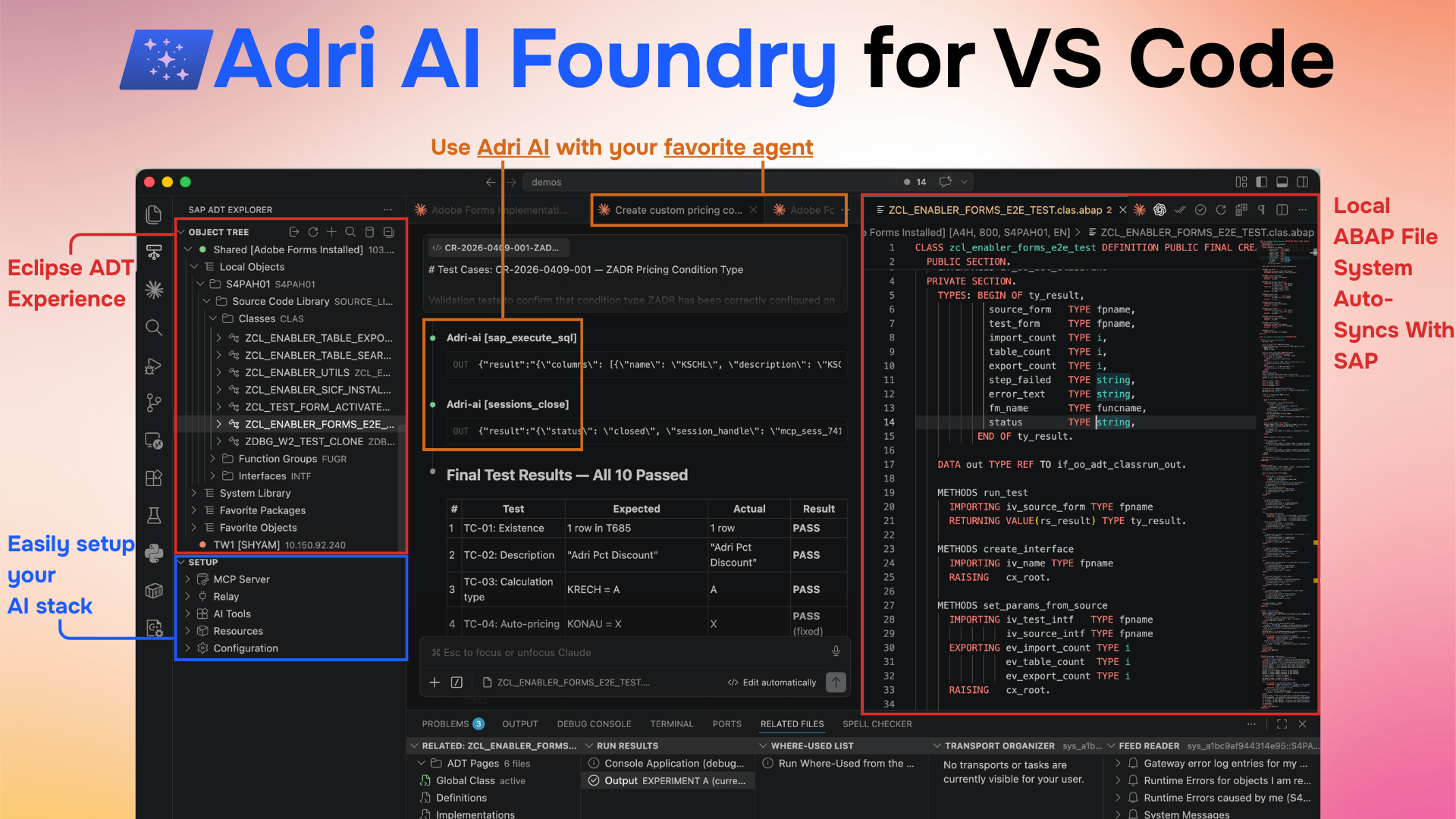
The screenshot shows three panes side by side:
- Left — the SAP ADT Explorer with an Object Tree of connected systems and the Setup section (MCP Server, AI Tools, Resources, Configuration).
- Center — your coding agent running tests and inspecting results against the connected SAP system.
- Right — the local file system view with the actual ABAP source open for review and edit.
For a guided tour of the underlying components, see Adri MCP Server and SAP Research Agent.
What teams use Adri AI Foundry for
Most SAP work falls into a handful of recurring programs. Adri AI Foundry is built around these focus tracks so a team can pick one and start producing outcomes the same week.
Focus tracks
- Migration — migrate old code and configuration to cloud-compliant or Clean Core targets.
- Project — implement change requests and feature requests end to end.
- Plan Clean Core — analyse the existing landscape and plan the Clean Core implementation.
- Reverse Engineer — recover specifications and documentation from existing custom objects.
- AMS Support — resolve incoming tickets automatically.
Common use cases
These are the concrete jobs teams run on Foundry today:
- Clean Core planning and assessment
- Lift and shift code to Clean Core
- RAP development
- Implement change requests — both configuration and code
- Answer incoming AMS tickets
- Write functional specifications
- Reverse engineer custom objects and write documentation
- Find standard SAP capabilities before building custom
For the full library, see the Use Cases section in the sidebar.
Powered by Adri AI capabilities
Each use case is composed from a shared set of capabilities — for example: write code, run code, read and write configuration, build a dependency graph of a custom object, find SAP Notes, find Business Hub APIs, read runtime error logs, create REST APIs, find release state, knowledge-base integration, read the Simplification List, run the debugger, run ATC checks, and rule mining. See the Capabilities section in the sidebar for the running list.
Upcoming tracks
- Data Migration — migrate data alongside code and configuration moves.
- Business Agents — agents built for business users, not just developers.
- Business AI — deploy AI projects directly for business users on the same Foundry stack.
One stack for every kind of agent
Most teams end up with a different toolchain for every kind of agent they build. Adri AI Foundry is meant to be a single stack that supports all of them:
- Code Agents — generate, refactor, debug, and test ABAP and other code against a real connected system.
- Configuration Agents — read and change SAP configuration safely, with the right context and guardrails.
- Data Agents — query, profile, and move data across SAP and adjacent systems.
- Business Agents — automate end-to-end business processes that span code, configuration, and data.
The same Foundry primitives — the MCP server, the SAP ADT explorer, sessions, resources, and (for VPN landscapes) the relay — power every one of these. Teams pick the agent shape they need; they don't pick a new platform.
Where this is heading
Adri AI Foundry is built as a platform for you to assemble your own AI stack on top of ours, not just a fixed set of tools.
- Build your own MCP servers on Adri's infrastructure. Customers, end users, and SI partners can ship their own specialized MCP servers that get SAP system access, browser use, and computer use through Adri AI's instrumentation — Adri provides the rails, you provide the domain logic. Our bar is that this should be a breeze for SAP consultants, not just for full-time developers.
- Beyond SAP. Adri AI Foundry is designed to connect with non-SAP enterprise systems too — for example, Workday and ServiceNow — so the same agent setup that works against your SAP landscape extends to the rest of your enterprise stack.