v3 - What Does the SAP Developer Own When an Agent Writes the Code? Example from a real client engagement
If an agent can investigate your custom code, implement a Change Request, and run the tests, what exactly is the SAP developer supposed to do? This is a question that I get frequently when we discuss our autonomous code development capabilities at Adri.
So, I thought I would illustrate how the role of an SAP developer is changing in an agent-led development workflow using an example inspired by a real client engagement.
I am affiliated with Adri, so it is the example I know firsthand but you can extend this example to any agent with similar capabilities.
What was the Change Request?
SAP Landscape: ECC
Environment: Dev sandbox
Current Flow:
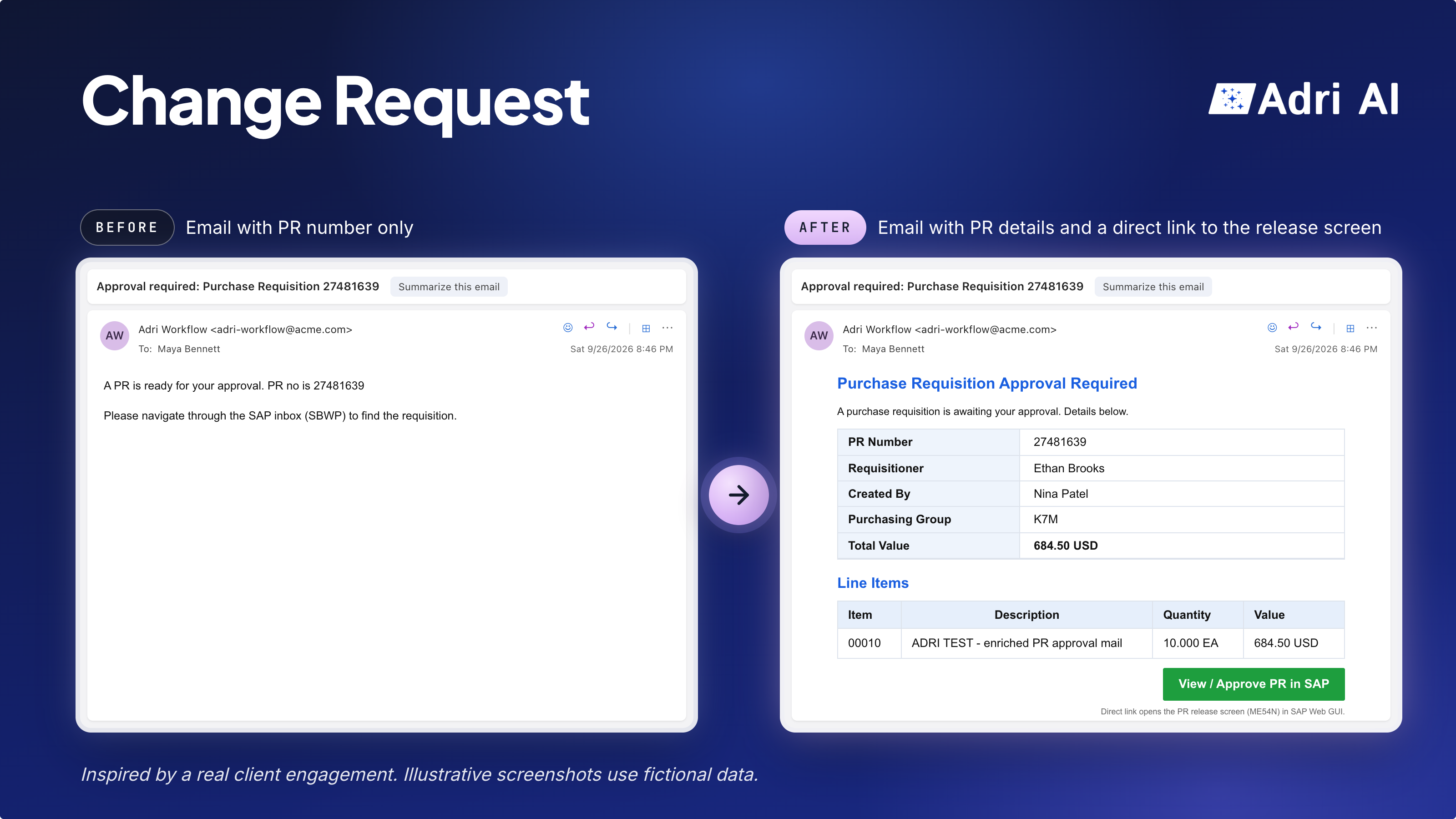
When a purchase requisition is created, an email is sent to users for approval. It contains only a short notification and the PR number. In the illustrative screenshot, it reads:
A PR is ready for your approval. PR no is 27481639
The approver then has to navigate through the SAP inbox (SBWP) to find the requisition.
Expected Flow:
Modify the workflow to send a rich HTML email. The illustrated version contains:
- A two-column table with the PR number, requisitioner, created by, purchasing group, and total value.
- A line-items table with the item number, description, quantity, and value. The example has one line item worth 684.50 USD, matching the total value above.
- A green, right-aligned “View / Approve PR in SAP” button below the tables. It opens SAP Web GUI directly on the release screen (ME54N) for that requisition, avoiding manual navigation through SBWP.
The approver can review the details in the email; approval still takes place in SAP.
The approval workflow was 11 years old. Its original developer had left, and the current team had limited knowledge of how it worked.
How did the work unfold?
The map below shows who participated at each step. Notice steps 4 and 6: resolving the authorization blocker and making testing safe required the agent, developer, and BASIS team to work together.
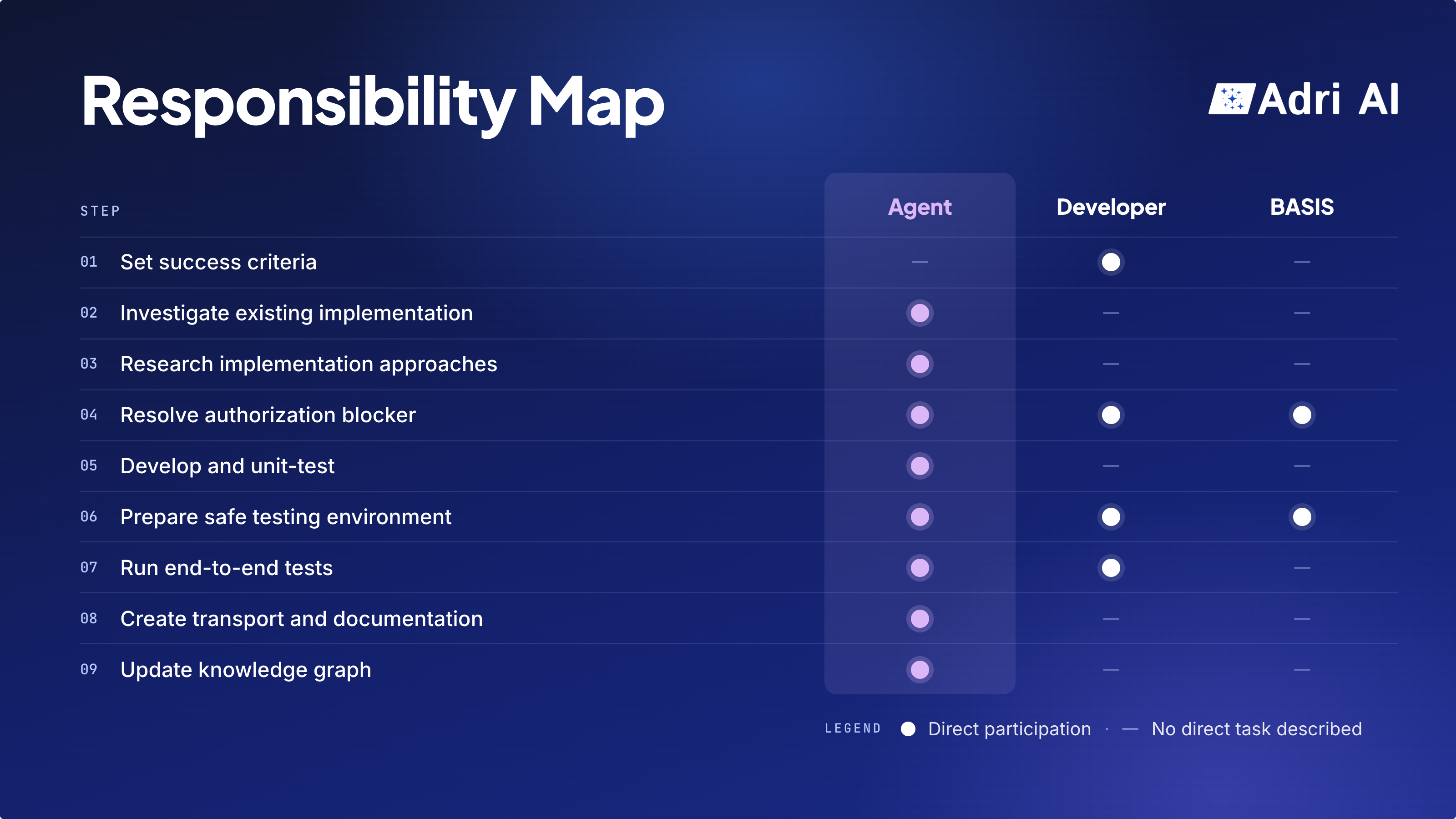
The dots indicate direct participation, not the amount of effort or overall accountability. The step-by-step breakdown below explains each role's task.
Step 1. Developer sets the success criteria
| Role | Task |
|---|---|
| Agent | No direct task at this step. |
| Developer | Since the ABAP team did not know the existing workflow behind this approval flow deeply, the most important and non-negotiable criterion for the developer was that the change should be easy to reverse in case the modified implementation behaved unexpectedly. |
| BASIS | No direct task at this step. |
Step 2. Agent investigates the existing implementation
| Role | Task |
|---|---|
| Agent | Agent traced the custom code and configuration to understand how approvers were identified, which release strategy controlled approval, and how emails were delivered. |
| Developer | No direct task at this step. |
| BASIS | No direct task at this step. |
Step 3. Agent researched possible implementation approaches
| Role | Task |
|---|---|
| Agent | Agent researched the system's configuration, and authorization setup and picked one approach that required minimal development work. |
| Developer | No direct task at this step. |
| BASIS | No direct task at this step. |
Step 4. Agent, developer and BASIS resolved the authorization blocker.
| Role | Task |
|---|---|
| Agent | Agent found that it could not modify the workflow with the available authorizations. It diagnosed the blocker, prepared a detailed request for BASIS and how they could implement it. |
| Developer | The developer discussed the request with BASIS, checked what the environment could support, and brought any constraints back to the agent. |
| BASIS | BASIS updated the authorization controls as per the specification created by Agent and in accordance with the firm's security policy. |
Step 5. Agent developed and unit-tested the solution
| Role | Task |
|---|---|
| Agent | Agent changed workflow nodes, created workflow containers, and integrated with the existing email infrastructure. It also unit-tested the components. |
| Developer | No direct task at this step. |
| BASIS | No direct task at this step. |
Step 6. Agent prepared the environment for end-to-end testing
| Role | Task |
|---|---|
| Agent | Agent identified that the sandbox could send approval emails to real users. So, it requested a safety measure for outbound email so that only a chosen set of developers and architects receive the approval email during testing. |
| Developer | The developer discussed the request with BASIS, checked what the environment could support, and brought any constraints back to the agent. |
| BASIS | BASIS updated the authorization controls as per the specification created by Agent and in accordance with the firm's security policy. |
Step 7. Agent performed end-to-end testing
| Role | Task |
|---|---|
| Agent | Agent analyzed the release strategy for PRs and past PRs to create test PRs. This triggered test emails. The team members who were temporarily added for end to end testing confirmed that they received emails in their inbox. |
| Developer | Developer set the requirement that the agent must trigger the workflow by creating real PRs and monitoring the SAPConnect activities. |
| BASIS | No direct task at this step. |
Step 8. Agent created the transport and documentation
| Role | Task |
|---|---|
| Agent | Agent created the transport from development sandbox. |
| Developer | No direct task at this step. |
| BASIS | No direct task at this step. |
Step 9. Agent updated the Knowledge Graph
| Role | Task |
|---|---|
| Agent | Agent updated the knowledge graph with the firm's email-delivery code pattern. |
| Developer | No direct task at this step. |
| BASIS | No direct task at this step. |
So what changes for the SAP developer when agents do more of the work?
A developer can delegate more investigation, implementation, and test execution to an agent.
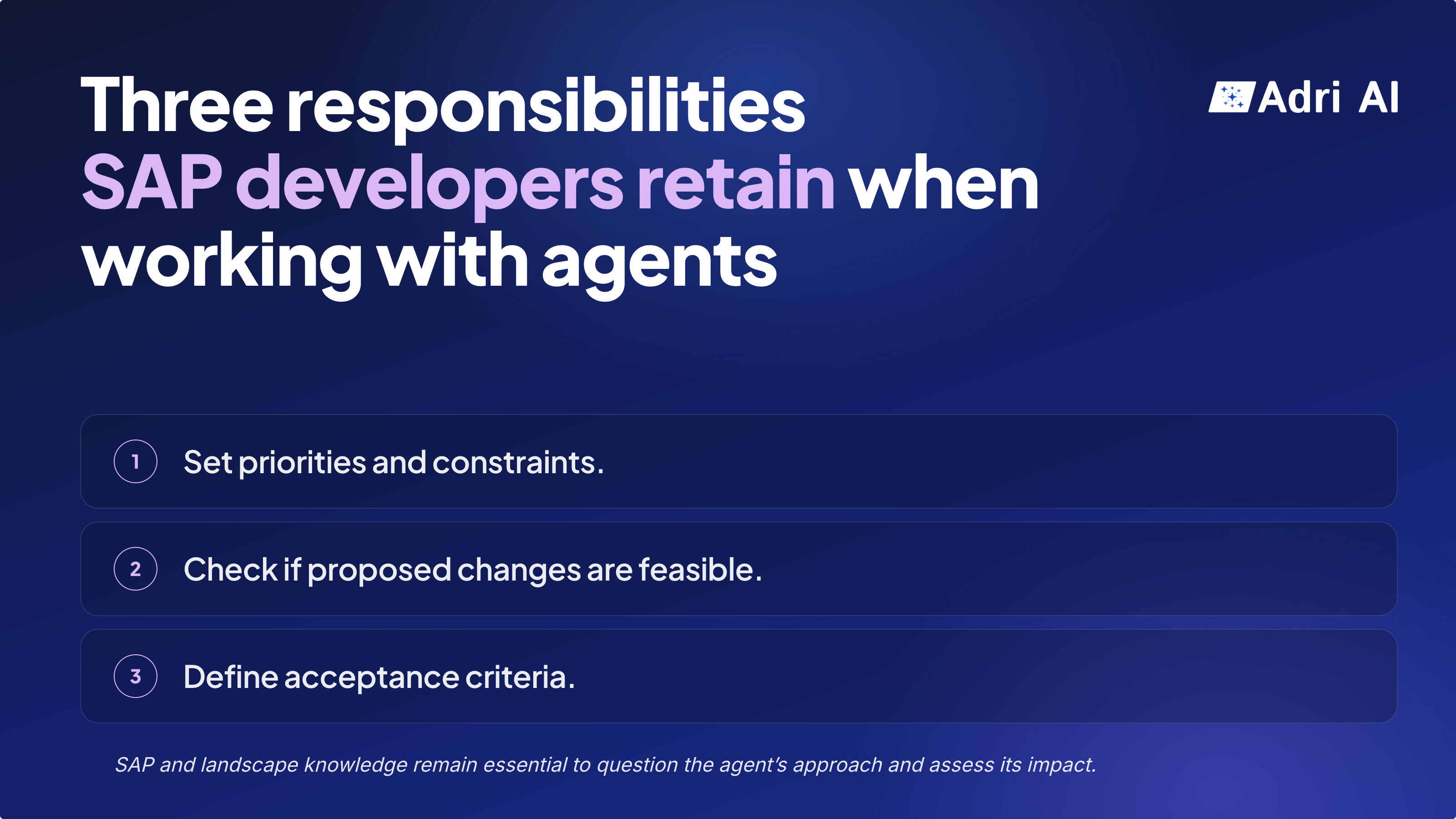
They still need to define what an acceptable solution looks like and decide when the work can proceed.
1. Set priorities and constraints.
Decide which risks matter most in the team’s circumstances. Here, limited knowledge of the existing workflow made reversibility non-negotiable.
The developer also specified how testing should happen: create real PRs and monitor SAPConnect.
2. Check whether proposed implementation is feasible.
Assess proposed changes with BASIS and security stakeholders, bring constraints back to the agent, and guide alternatives when needed.
3. Decide what must be verified before testing or accepting a change.
Establish what must be verified before testing or accepting a change, including email containment, authorization controls, and recovery. A passing test is one input to that decision.
As you can see, a developer still needs significant SAP and landscape knowledge to question the agent's approach and understand the consequences of its proposed changes.
I hope this gives you a clearer picture into how the roles and responsibilities of an SAP developer are changing as agents handle more and more of the development lifecycle. Happy to hear how your agentic development flow looks like.